





DAST
Architecture overview (Standard)
-
Last updated: October 29, 2026
-
Read time: 2 Minutes
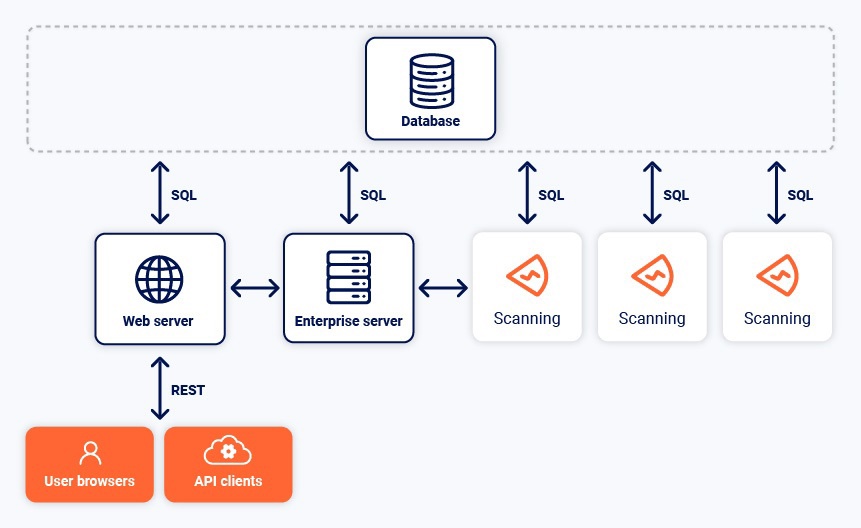
The following diagram shows the core components of Burp Suite DAST and the connections between them.
DAST server
The DAST server is the main application server. It coordinates between the other components. The DAST server is always installed on the same machine as the web server.
Web server
The web server provides the interface to users either via the web UI or one of the APIs. The web server is always installed on the same machine as the DAST server.
Database
Burp Suite DAST uses a SQL database to store all the application data, including scan data. You can use one of the following options:
- An embedded database that can be installed on the same machine as the DAST server and web server. The embedded database is designed for trials and evaluations of Burp Suite DAST. It is not intended for production use. For production use, we recommend that you use your own external database.
- Your own external database. We recommend using an external database for production use. This option enables you utilize any existing database infrastructure that you have, including database backups.
Services
Burp Suite DAST installs the following services on your machine:
-
burpsuiteenterpriseedition_agent.service -
burpsuiteenterpriseedition_enterpriseserver.service -
burpsuiteenterpriseedition_webserver.service -
burpsuiteenterpriseedition_db.service*
* burpsuiteenterpriseedition_db.service is only installed if you're using an embedded database rather than your own external one.
Read more
Scans and scanning machines
For standard instances, scans run on a scanning machine. We recommend that you deploy dedicated external scanning machines. You can deploy as many scanning machines as you need to support the number of concurrent scans you want to run.
We do not recommend installing scanning machines on the DAST server machine, because this may degrade performance.
After deployment, you can group scanning machines into scanning pools for greater control over scanning resources.
Next step - Single vs. multi-machine architecture