





This release adds a React2Shell scan check, a keyboard-driven command palette, and easier memory management - plus updated Intruder payloads, hotkey support, and key usability improvements.
New scan check for React2Shell (CVE-2025-55182, CVE-2025-66478)
We've added a new active scan check for React2Shell, a critical remote code execution vulnerability affecting React Server Components in React and Next.js. This check is enabled by default and runs once per host.
Take command of Burp from your keyboard with the Command palette
We've added a Command palette to help you quickly find and use Burp's features using just your keyboard. Press Ctrl+K or Cmd+K and start typing to access commands, search your project file, find extensions in the BApp store, and invoke extensions without navigating menus.
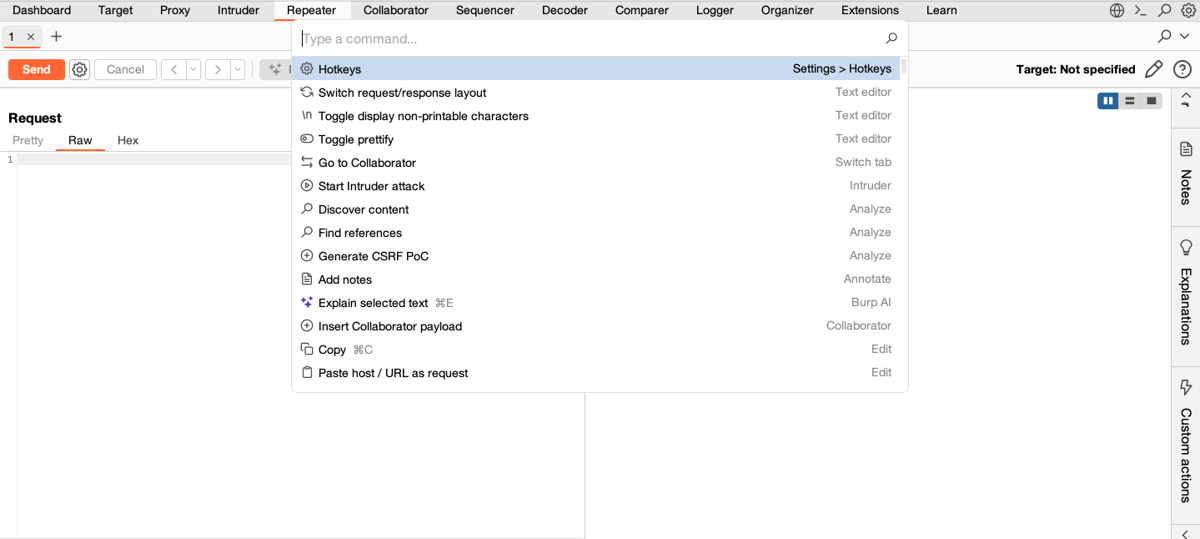
If you've already assigned Ctrl+K or Cmd+K to another command, the Command palette won't have a default hotkey. You can set one manually in Settings > User interface > Hotkeys. For more information, see Command palette.
Adding extension commands to the Command palette
If you're an extension developer, you can now add your own commands to the palette by registering named hotkeys. For full instructions, see Adding a hotkey to your Burp extension.
Manage Burp's memory usage more easily
We've updated the Maximum memory usage setting description to explain more clearly how Burp uses available memory and how you can adjust this to balance Burp's performance with your system's needs.
In addition, the setting is now easier to discover:
- You can access it directly from the bottom status bar, which also shows the current memory usage and the total memory allocated to Burp.
- It has been moved to a new Suite > Performance category in the Settings window.
For more information, see Maximum memory usage.
Burp Collaborator interaction handling in custom scan checks
You can now use Burp Collaborator in active custom scan checks to detect out-of-band vulnerabilities.
To enable this, turn on Use Collaborator in your check, then add an interaction handler in the new Collaborator tab. Burp will poll for interactions and pass them to your handler for analysis and reporting.
Burp continues monitoring for delayed interactions even after the scan completes, as long as the check remains active.
For more information, see Using Collaborator in checks.
Updated Intruder payload lists
We've updated Burp Intruder's predefined payload lists based on the PortSwigger XSS cheat sheet.
You can select these directly from the Add from list... dropdown when configuring a payload in Intruder.
Quality of life improvements
We've made the following quality of life improvements:
- Burp no longer overwrites the original response in the site map when later requests to the same URL return a
304response. This helps you access more useful context directly from the site map. - We've updated Burp's certificate to include the Authority Key Identifier and Subject Key Identifying extension. This ensures compatibility with newer Python libraries and prevents TLS errors during interception.
- Reports you save from the target analyzer now include the
.htmlextension by default, so you can open them immediately without renaming. You can now assign hotkeys for the following commands:
- Run Burp AI tasks from Repeater.
- Switch between sub-tabs.
- Rename Repeater tabs.
- We've added icons and categories to help you navigate hotkeys more easily.
Bug fixes
We've fixed the following bugs:
- A bug where the Hide items without responses filter in the task Logger tab on the Dashboard wasn't being applied correctly.
- We've updated the video link in the Learn tab to point to the correct content.
- A bug where changing the severity of multiple issues could cause Burp to freeze.
- A bug that prevented the Reshaper extension from loading in Burp 2025.10.2 and later if user-defined rules were present.
Browser upgrade
We've upgraded Burp's browser to Chromium 143.0.7499.41 for Windows & Mac and 143.0.7499.40 for Linux. For more information, see the Chromium release notes.